How the internet works?
The internet has been a life-changing resource for the LGBTQ+ community, allowing individuals to connect, find support, and express themselves freely. It is a part of everyday life for most people. However, for members of the LGBTQ+ community, maintaining privacy and security online is not just a matter of convenience - it can be vital for safety. Discrimination, harassment, and threats are still a reality that many queer individuals face, making digital security essential.
HTTP and HTTPS

Have you ever encountered a warning page saying a website you are visiting is not secure? In most cases, it means you are browsing the website with HTTP.
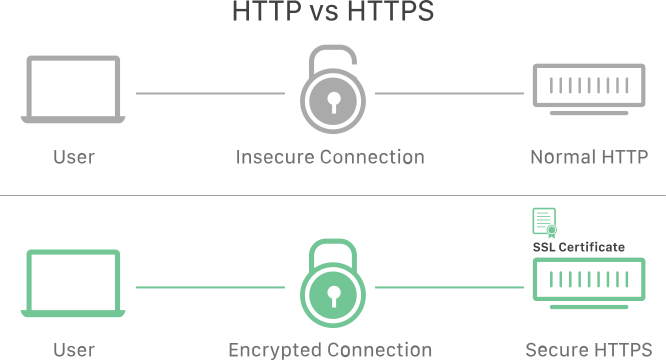
image by Cloudflare
There are two ways for a website to reach your browser: HTTP and HTTPS. The difference lies in the 'S,' which stands for 'secure.' HTTP was initially created for internet browsing; however, it is not encrypted, making browsing vulnerable to attacks. To address this, HTTPS was introduced as a secure and encrypted successor.

Screenshot from Google Transparency Report
Currently, almost all websites redirect their traffic to HTTPS by default. That’s why, even if you only enter 'Google.com,' your browser will direct you to https://google.com.
However, some websites like the SUHAKAM Aduan site, it is available both in HTTP and HTTPS. Browsing with HTTP poses security risk, as it is not encrypted anything you enter into the browser is visible to the network and Internet Service Provider (ISP), like Unifi, Maxis, etc (like passwords).
Difference between HTTP and HTTPS
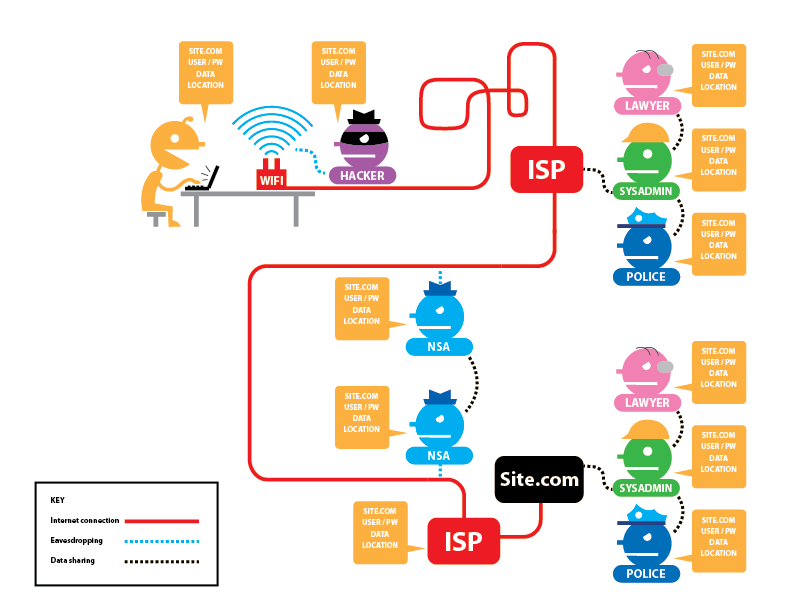
Visit this interactive infographic to explore the differences between browsing with HTTP and HTTPS. The table below compares what happens when logging into an account on aduan.suhakam.org.my using HTTP versus HTTPS.
| What can your Internet Provider access? | |
| While browsing with HTTP |
|
| While browsing with HTTPS |
|
Recommendation
The Suhakam Aduan website is available in both HTTP and HTTPS, most modern browsers these days would direct to the HTTPS. As a general digital security step, it is recommended to ensure the HTTPS-Only feature is turned on.
- Chrome: Settings > Security and Privacy > Security, scroll to the bottom, and then toggle to “Always use secure connections.”
- Firefox: go to Settings > Privacy & Security, scroll to the bottom, and then select Enable HTTPS-Only Mode.
Further resources:
- https://howhttps.works/https-ssl-tls-differences/ - Comic Guide
- https://catnip.article19.org/ - Comic Guide