Two-factor Authentication
What is Two-Factor Authentication (2FA)?
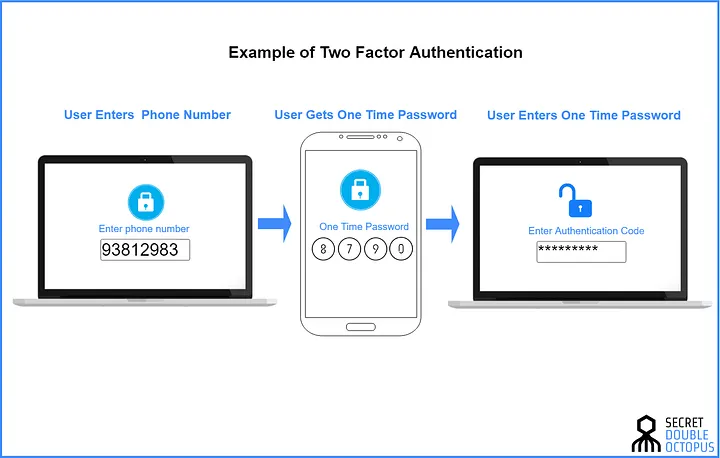
Illustration by DoubleOctopus
Two-factor authentication (2FA), as the name suggests, involves the use of two distinct factors to verify your identity. Traditionally, the primary factor is a password or PIN, and the secondary factor can be a diverse range of elements such as a code, device, or biometric data. By requiring two independent authentication methods, 2FA adds an extra dimension of security, making unauthorized access significantly more challenging.
Why Use 2FA?
Two-Factor Authentication (2FA) is an essential security measure that adds an extra layer of protection to your online accounts. Here are some practical reasons and scenarios that highlight the importance of using 2FA:
Protecting Your Email Account
- If your email account gets hacked, the hacker can access all your personal and professional communications, reset passwords for other accounts linked to your email, and even steal sensitive information. By using 2FA, you add an additional step for verification, making it much harder for unauthorized individuals to gain access.
- In 2016, a group of hackers gained access to the email account of John Podesta, Hillary Clinton’s campaign chairman, through a phishing attack. If 2FA had been enabled, the hackers would have needed an additional verification code to access the account, likely preventing the breach. Read more here.
- Online banking involves transactions that directly impact your finances. Using 2FA for your banking apps and websites ensures that even if someone steals your password, they still can’t access your account without the second factor.
- In Malaysia, it’s common for banks to send a one-time code via SMS for every online transaction. For example, when transferring money through Maybank2u, a popular online banking service, you receive a TAC (Transaction Authorization Code) via SMS. This extra step ensures that even if someone knows your banking password, they cannot complete the transaction without also having access to your phone.
How Does 2FA Work?
The fundamental principle guiding 2FA is the combination of "something you know" (password), "something you have" (the secondary factor), and "something you are" (the third factor). When a user attempts to access an account, they must provide all three elements for successful authentication. This multi-layered approach significantly reduces the likelihood of unauthorized access, even if one of the factors is compromised.
Something you know: this could be a piece of information that you know, such as a password, passphrase, PIN, or the answer to a security question.
Something you have: like a physical security key, mobile phone, or a smart ID card.
Most Services Provide 2FA
Many online services offer 2FA to help protect your accounts. You can find a list of these services at https://2fa.directory/. This site lists down whether the online platform supports 2FA and include documentations how to enable 2FA.

Types of 2FA
SMS or Voice-Based 2FA:
- This traditional form of two-factor authentication (2FA) involves receiving a one-time code via SMS or voice call. It’s very common for bank transactions in Malaysia.
- SMS based 2FA is inherently not secure
Authenticator Apps: Apps like Authy generate time-sensitive codes, providing a more secure alternative to SMS-based 2FA.
2FA Security Keys: These are physical security keys, often in the form of USB devices. They offer robust protection by requiring users to physically connect the key for authentication.
2FA Push Notifications: Popularized by apps like Duo or Microsoft Authenticator, push notifications prompt users to approve or deny access requests.
Biometric 2FA: Using unique biological features like fingerprints or facial recognition, biometric 2FA offers a seamless yet highly secure authentication method. Because it is difficult to spoof, it is increasingly used to provide access methods that eliminate the use of passwords, known as passwordless authentication. But biometric authentication also comes with its own risk. If a biometric 2FA system gets hacked and your fingerprint or face is leaked or replicated, you can't change them.
Examples of 2FA Applications
There are several popular apps you can use for 2FA:
- Authy: Easy to use and syncs across multiple devices.
- Duo: Known for its security features, used by many organizations.
- Bitwarden Authenticator: Integrated with the Bitwarden password manager for added convenience.
Online and Offline Syncing
2FA apps can be either online or offline, and this affects how they handle syncing and backups.
Online Syncing:
- Apps like Authy, Google Authenticator, and Microsoft Authenticator require you to sign up for an account. Once you have an account, your 2FA details are automatically synced with the provider. This means you can access your 2FA codes on multiple devices and recover them easily if you lose your phone.
Offline Syncing:
- Apps like Duo and Bitwarden Authenticator do not sync your 2FA details by default. This means you need to manually back up your 2FA codes. If you lose your phone without a backup, you might lose access to your accounts.
Tips for Using 2FA
- Enable 2FA on All Accounts: Use 2FA on all accounts that support it to maximize your security.
- Choose the Right 2FA App: Consider whether you prefer online syncing or offline backups.
- Backup Your 2FA Codes: If you use an offline app, make sure to manually back up your 2FA codes in a safe place.
- Stay Informed: Regularly check for updates on the security features of your 2FA app to ensure you're using the most secure and convenient option available.